Posts

Showing posts with the label Hadoop

Hive vs Spark vs Presto: SQL Performance Benchmarking
Image
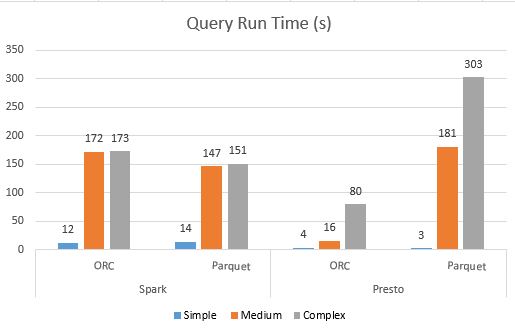
In my previous post, we went over the qualitative comparisons between Hive, Spark and Presto . In this post, we will do a more detailed analysis, by virtue of a series of performance benchmarking tests on these three query engines.  Benchmarking Data Set For this benchmarking, we have two tables. Some of the key points of the setup are: - All the query engines are using the Hive metastore for table definitions as Presto and Spark both natively support Hive tables - All the tables are external Hive tables with data stored in S3 - All the tables are using  Parquet  and  ORC  as a storage format Tables : 1. product_sales: It has ~6 billion records 2. product_item: It has ~589k records Hardware Tests were done on the following EMR cluster configurations, EMR Version: 5.8 Spark: 2.2.0 Hive: 2.3.0 Presto: 0.170 Nodes: Master Node:   1x  r4.16xlarge Task nodes:  8 x r4.8xlarge Query Types There are thre...

Hive vs Spark vs Presto: Which Query Engine to Choose?

Now that we have covered setting up our machines to learn big data , the next question that we need to answer should be around different choices we have. The best thing about the Apache toolkit for big data is the number of choices for query engines. In this post, I will compare the three most popular such engines, namely Hive, Presto and Spark. These choices are available either as open source options or as part of proprietary solutions like AWS EMR. Hive Hive is the one of the original query engines which shipped with Apache Hadoop. Over the course of time, hive has seen a lot of ups and downs in popularity levels. There are two major functions of hive in any big data setup. Hive Metastore One of the constants in any big data implementation now-a-days is the use of Hive Metastore. Hive ships with the metastore service (or the Hcatalog service). This service allows you to manage your metastore as any other database. You can host this service on any of the popular RDBMS (...

Setting Up Presto On Your Machine

Image
This is the fourth post in this series, geared up to making the reader self-sufficient for learning big data applications. In the previous posts of the series, we have installed Hadoop, Hive on the same namenode and MySQL metastore for Hive. In this post, we will build on the same setup and install Presto to use the same HDFS and Hive metastore. Let's get started then. Prerequisites Setup your machine for learning big data Setup Apache Hadoop on your machine Setup Apache Hive on your machine Installing Presto Again, we will use Homebrew to install Presto on our machine. Run brew install presto on your terminal. Configuring Presto You will need to edit following files ( at location etc/ ): node.properties config.properties log.properties jvm.config Export Environment Variables Add the following to your .bash_profile file and restart terminal (or source it): export PRESTO_VERSION=0.221 export PRESTO_HOME=/usr/local/Cellar/presto/0.221/l...

Hive Challenges: Bucketing, Bloom Filters and More

In the second post of this series, we will learn about few more aspects of table design in Hive. Now that you know about partitioning challenges , you will be able to appreciate these features which will help you to further tune your Hive tables. Bucketing In addition to Partitioning the tables, you can enable another layer of bucketing of data based on some attribute value by using the Clustering method. Clustering can be used with partitioned or non-partitioned hive tables. One particular use case where Clustering becomes useful when your partitions might have unequal number of records (e.g. users logging in per country, US partition might be a lot bigger than New Zealand). In such cases, you can define the number of buckets and the clustered by field (like user Id), so that all the buckets have equal records. In partitioning each partition gets a directory while in Clustering, each bucket gets a file. Records with the same bucketed column will always be stored in the same bucke...

Setting up Apache Hive on your Machine

Image
This is the third post of this series where we are setting up our machines to get started with learning big data. In the first post, we have installed and configured Hadoop on our Macbook and now we will install Apache Hive and use the same Hadoop cluster to save data in HDFS. Let's get started then. Prerequisites 1. Setup your machine for learning big data 2. Setup Apache Hadoop on your machine Installation We will be installing Hive 1.2.2, so we need to update the brew formula (as we did for Hadoop in the previous article). Use brew edit hive to open the formula and edit it to have these values: url " https://www.apache.org/dyn/closer.cgi?path=hive/hive-1.2.2/apache-hive-1.2.2-bin.tar.gz " sha256 "763b246a1a1ceeb815493d1e5e1d71836b0c5b9be1c4cd9c8d685565113771d1" Once you have updated the formula, install hive using brew install hive Modify Hive Configurations First things first, we need to edit the .bash_profile fil...

Setting your Macbook for Apache Hadoop

Image
This is the second post in this series, I will walk you through the steps to run Hadoop on your puny little Macbook. If you ever had a hesitation in learning about Hadoop services because of a lack of a "place to run code", you need to find another excuse for not learning Hadoop after this post. I will be using Homebrew for installing a lot of things in this series, it makes your life a lot simpler.  Pre-requisites You need to have Java installed. And you need to know how to set up your bash_profile. If you don't know how to do it: Creating your bash_profile file   Installation The way Homebrew works is that it will pick the latest available stable build and install it. But, in our case, we need our Hadoop installation to support other services like Hive and Presto so we need to go for a stable build of Hadoop, which in our case is 2.7.6. For installing a previous version, you need to get the checksum of the older version and add that to the Hadoop f...